Short answer
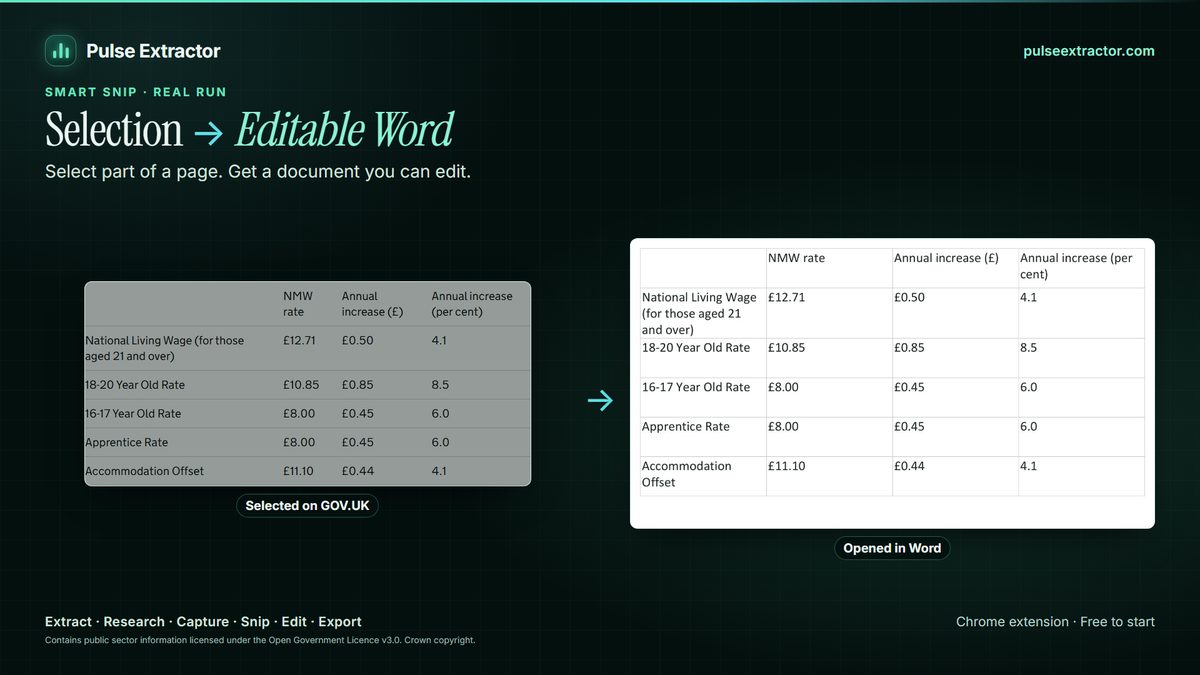
Decide first whether you need plain text or structured output. For text from one image, Chrome's built-in Google Lens is enough. For tables and regions you want as Excel, CSV or JSON, choose an extension that reconstructs rows and columns, such as Pulse Extractor Smart Snip, which is live, reads English and several other languages, and runs recognition in the extension.
The checklist
| Question | Why it matters |
|---|---|
| Does it return tables as rows and columns? | Plain text from a table costs you the cleanup time you were trying to save |
| Which export formats? | Excel, CSV and JSON are what spreadsheets and scripts accept |
| Where does recognition run? | On your computer or on a server: know where your images go |
| Which languages and scripts? | Many tools are strong in English only |
| What does it do when unsure? | Guessing silently is worse than flagging a cell for review |
| What are the limits and price? | Monthly allowances, and whether a card is needed to start |
How Pulse answers the checklist
- Tables: reliable tables become editable rows; uncertain parts stay visible for review.
- Formats: Excel, CSV, JSON, PDF and PNG from Smart Snip, plus editable Word and PowerPoint replicas in the current release.
- Where it runs: Smart Snip recognition runs in the extension on your computer.
- Languages: English, Chinese, Japanese, Russian, German, Spanish, French, Portuguese and Italian, with Arabic and Traditional Chinese in Beta; accuracy varies, so review the result.
- Price: Free includes 20 Smart Snips a month with no card; Lite $6.99/month includes 60; Starter $12/month includes 100; Pro and Intelligence are unlimited.
- More than OCR: the same extension extracts whole pages, researches companies and captures full pages.
When Pulse is not the right tool
- Bulk OCR of hundreds of saved files: use a desktop or batch OCR tool.
- A script Pulse does not read yet, such as Urdu, Hindi, Persian or Turkish (planned): use a tool specialized in that script.
- Handwriting: not supported today.
Limitations to know
- Language. English, Chinese, Japanese, Russian, German, Spanish, French, Portuguese and Italian, with Arabic and Traditional Chinese in Beta; accuracy varies by language, script and image quality.
- Dense or unusual layouts may need a quick review; uncertain parts are kept visible rather than guessed.
- Protected browser pages. Chrome does not let extensions run on its own protected pages, such as browser settings or the Chrome Web Store, so Pulse is unavailable there. That is a browser restriction, not a Pulse setting.
Questions
Does Pulse upload my images for OCR?
Smart Snip recognition runs inside the extension on your computer. Account and usage checks talk to Pulse servers; the selected pixels are read locally.
Is there a free OCR extension that exports to Excel?
Pulse Extractor's Free plan includes 20 Smart Snips a month with Excel, CSV and JSON export and no card required.