Convert an image or screenshot to an editable Word document
Draw a box around a flyer, a notice, a report page or any image on screen, and get back a Word document you can actually edit: headings, paragraphs and genuine editable tables laid out as they appeared. This is live in Pulse Extractor 0.5.8.
- Live now in Pulse Extractor 0.5.8
- Free plan, no card required
- Runs in Chrome on the page you are viewing
Three steps.
- 01Open the page or image showing what you need
- 02Click Smart Snip and draw a box around the region
- 03Download the Word (.docx) replica
Watch it in action.
Image → Editable Word
Snip text from an image or notice and turn it into editable Word content.
In “Image → Editable Word”: Smart Snip reads an English notice found as an image on the web and opens the result in Microsoft Word as editable content.
Video previews do not contact YouTube until you press play. When you play a video, YouTube receives the normal information required to deliver the video. Playback uses YouTube's privacy-enhanced mode. All video tutorials
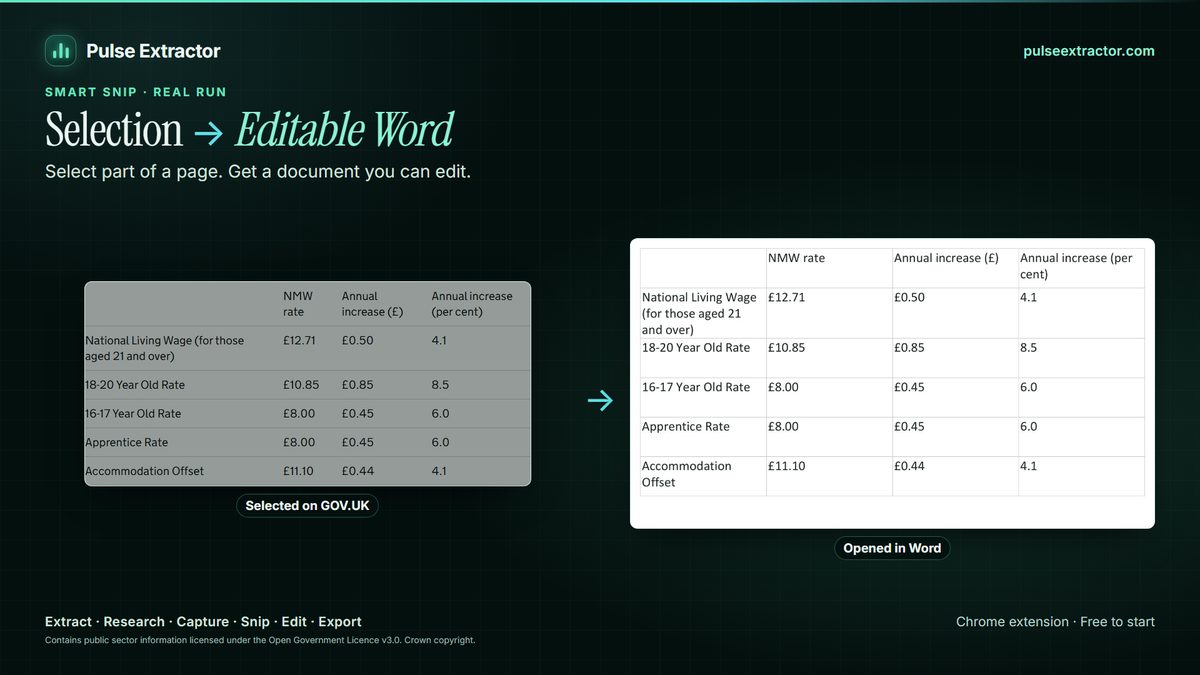
An editable replica, not a picture pasted into a page
Pasting a screenshot into Word gives you a picture of a document inside a document: nothing in it can be edited, searched, translated or reflowed, and it prints badly. A Word replica is rebuilt from what Pulse read instead. Headings stay headings, paragraphs stay paragraphs, and a table arrives as a real Word table whose cells you can retype, not as an image of a table.
One snip can produce more than one document, so the same region can become a Word replica and a PowerPoint slide without snipping it twice, and several snips can be assembled into a single document. Word and PowerPoint export also covers Extract Page and Research results, so a finding can leave Pulse in the format the next person expects to receive.
What comes out, and where it can go.
- Word (.docx)Preserve layout: headings, paragraphs and real Word tables where they appeared.
- PowerPoint (.pptx)The same region as an editable slide, without snipping twice.
- Text and TXTJust the words, to copy or save. Copying never counts as an export.
- Excel, CSV, PDF, PNGThe table as a workbook, a PDF, or the image itself, from the same selection.
Free to start. Pay when you need more.
No card for the free plan. Copying a result never counts against anything. Annual plans are also available on the pricing page.
- Free$0
- 20 Smart Snips a month
- 20 Page Extractions a month
- 20 Full-Page Captures a month
- 10 Professional Exports a month
- 1 lifetime Research run
- Lite$6.99/month
- 100 Page Extractions a month
- 100 Full-Page Captures a month
- 100 Professional Exports a month
- 60 Smart Snips a month
- 3 Research runs a month
- Starter$12/month
- Unlimited Page Extractions
- Unlimited Full-Page Captures and Professional Exports
- 100 Smart Snips a month
- 15 Research runs a month
- Pro$29/month
- Everything in Starter
- Unlimited Smart Snip
- 40 Research runs a month
- Intelligence$59/month
- Everything in Starter
- Unlimited Smart Snip
- 100 Research runs a month
Can I use this today?
Yes. Editable Word replicas are live in Pulse Extractor 0.5.8, the current Chrome Web Store release. Draw a box with Smart Snip, then choose Word · Preserve layout; the same snip also exports as Excel, CSV, JSON, TXT, PDF or PNG.
Is the table in the Word file really editable?
Yes. A table comes through as a genuine Word table with editable cells, not as a picture placed inside the document. You can retype a value, add a row, or restyle it as you would with any table you typed yourself.
How close is the replica to the original?
It keeps the reading order and the visible structure (headings, paragraphs, lists and tables) and positions them to match the layout you snipped. It is a rebuilt, editable document rather than a pixel-perfect facsimile, so fonts are matched to close equivalents and some decorative styling is approximated. Where a bullet marker cannot be identified exactly, Pulse uses the closest standard marker.
Does the screenshot leave my computer?
No. Smart Snip recognition runs inside the extension on your own machine.
Can I get PowerPoint from the same snip?
Yes, and without snipping twice. One selection can produce an editable Word document and an editable PowerPoint slide. Both are live in 0.5.8.
Will it work on a scan or a photo of a page?
It works on what is on your screen, so a scan or photo you have open will snip like anything else. A clean, straight, reasonably sized page reads best; a skewed phone photo of a page is the harder case, and scan cleanup and perspective correction are planned for a later release.
Can I convert a JPG or PNG that is saved on my computer?
Yes. Open Local File opens a PNG, JPEG, WebP or PDF from your computer in Smart Snip; the file is opened on your device and is not uploaded. Smart Snip also works on any image open in Chrome, and Ctrl+V pastes a screenshot.
Explore more.
Step by step: Extract text from an image · Convert a live webpage to Word · Choosing an OCR Chrome extension
Reviewed by the people already using it.
Exactly what our office needed to speed up data collection. It’s straightforward & efficient. Great productivity booster.
Pulse Extractor saves our team a ton of time on web research. simple, fast, and genuinely useful..
Real published reviews, quoted exactly. Read them on the Chrome Web Store
Turn your next screenshot into a document you can edit.
Install Pulse, create a free account, and get your first Word replica in under a minute. No card required.