Convert a webpage to an editable Word document
Two ways in, one editable .docx out: export the whole page's structured result as a Word report, or draw a box around one part of it and get a Word replica that keeps its layout and real tables. Both are live in Pulse Extractor 0.5.8.
Three steps.
- 01Open the page you need in Word
- 02Click Extract Page for the whole page, or Smart Snip for one region
- 03Download the Word (.docx) export
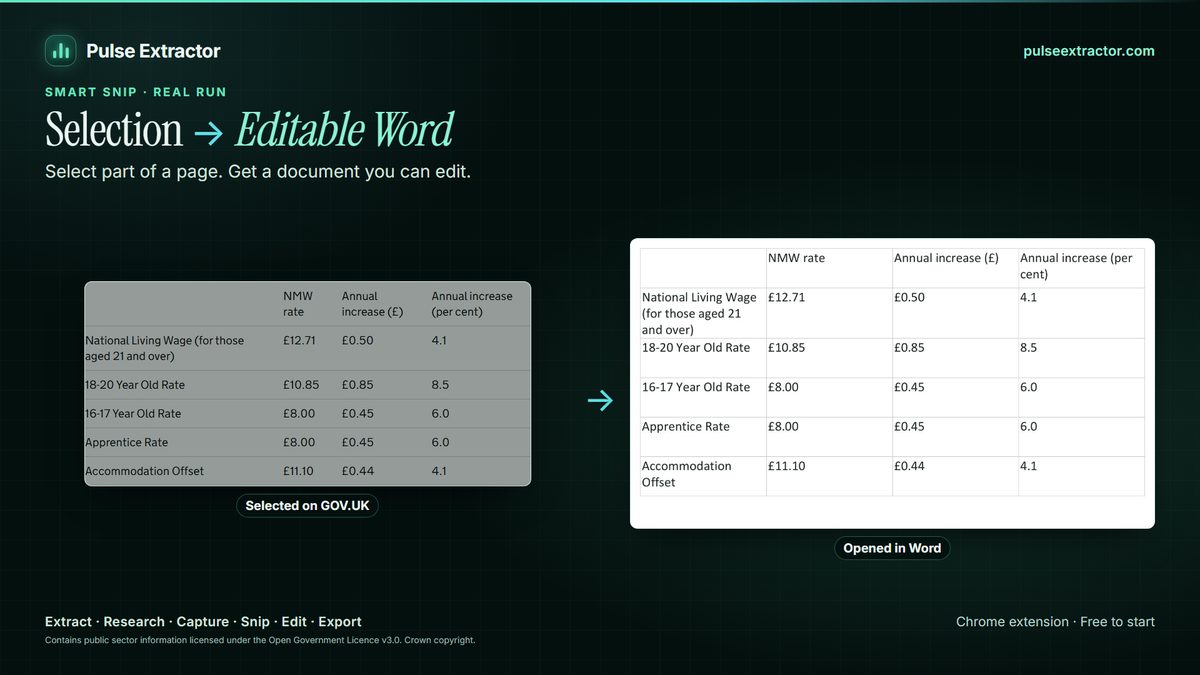
A report of the page, or a replica of one part of it
Copying a webpage into Word drags the site along with it: navigation, buttons, odd fonts, and tables that collapse into tabs or overflow the page. Pulse starts from what the page actually says instead. Extract Page structures the page, then writes that result as a Word report with headings and real Word tables. Smart Snip takes just the region you draw around and rebuilds it as an editable replica, so a rates table or a notice arrives as a document you can retype, restyle and send.
Use the report when you want the page's information in a document: a supplier page, a product page or a company profile, organized into sections. Use the replica when one part of the page has to look like it did: a published table, a price list, a notice. The same Smart Snip also exports as PowerPoint, Excel, PDF or text, and several snips can go into one document, so the page is pulled apart once whatever the destination.
Two honest limits. The Word report is built from what Extract Page structured, not a word-for-word copy of every paragraph and image, so a long article you want verbatim is better saved with the browser's own Save as PDF. And a replica is a rebuilt document rather than a facsimile: fonts are matched to close equivalents and some decorative styling is approximated. When the exact look of the whole page matters, Capture Full Page keeps it as a PNG or a multi-page PDF.
What comes out, and where it can go.
- Word report (.docx)The structured result of the whole page, in sections, with real Word tables.
- Word replica (.docx)One region rebuilt as an editable document that keeps its layout.
- PowerPoint, Excel, PDFThe same result or region in the format the next person expects.
- Copy and TXTJust the words. Copying never counts as an export.
Can I use this today?
Yes. Word export for Extract Page and Research results, and editable Word replicas of a Smart Snip region, are live in Pulse Extractor 0.5.8, the current Chrome Web Store release.
Is the Word file editable?
Yes. Headings are headings, paragraphs are paragraphs, and tables are genuine Word tables whose cells you can edit, not a picture of the page placed in a document.
Will it copy a whole article word for word?
The Word report is built from what Extract Page structures, so it is a document about the page rather than a verbatim copy. For one section you need exactly as it appears, Smart Snip it into a replica; for the whole article as it stands, the browser's Save as PDF keeps the text.
How is this different from saving the page as PDF?
A PDF keeps the page fixed. A Word document is for changing it: correcting a line, translating it, restyling it to your template, or pasting it into a report.
Does it use an export?
A downloaded .docx counts as one Professional Export. Free includes 10 Professional Exports a month; Starter, Pro and Intelligence are unlimited. Copying text never counts.
Explore more.
Step by step: Convert an image or screenshot to Word · How to save a full webpage as a PDF
Reviewed by the people already using it.
Exactly what our office needed to speed up data collection. It’s straightforward & efficient. Great productivity booster.
Pulse Extractor saves our team a ton of time on web research. simple, fast, and genuinely useful..
Real published reviews, quoted exactly. Read them on the Chrome Web Store
Turn this page into a structured result.
Install Pulse, create a free account, and extract your first page in under a minute. No card required.