Start with the company's own website, confirm its legal identity in the official company register for its country, then check what independent public sources say about it. Write down where each fact came from, and keep anything you could not confirm clearly marked as unverified.
Step 1: Decide what you need to know
A supplier check, a sales call and a job interview need different depth. Write down the three to five questions that matter before you start, for example: what does the business actually do, is it a registered and active company, where does it operate, who is the right contact route, and has it done work like ours before. It keeps the research short and stops you collecting facts you will never use.
Step 2: Read the company's own website in a set order
- Home and About: what the business says it does, its sector and how long it has operated.
- Services or Products: the service lines or product ranges it actually sells.
- Projects, case studies or clients: evidence of real work, and the kind of customers it serves.
- Locations and Contact: offices, countries and the contact routes it publishes.
- News or Press: recent activity, contract wins and changes.
- Careers: hiring is a useful signal of growth and of which teams exist.
- Footer and legal pages: the registered legal name, registration number and registered address often sit in the footer, an imprint page, or the terms and privacy pages.
Step 3: Confirm the legal identity in an official register
Most countries run a public company register. In the United Kingdom it is Companies House; publicly traded companies in the United States file with the SEC, and most US states run their own business entity search. Look up the legal name or registration number you found on the website and check:
- the exact registered name, and whether it matches the trading name you have been dealing with;
- the status, such as active or dissolved;
- the registered address;
- the officers or directors, where the register publishes them.
For anything with legal or financial weight, this step is the one to do yourself, directly in the register.
Step 4: Check what independent public sources say
- News coverage and press releases from other organizations.
- Industry association member directories.
- Public procurement and contract award notices, which show who has actually bought from the company.
- The company's own professional network and social profiles, to cross-check people and locations.
- Review sites, for consumer facing businesses.
Step 5: Record it with sources
A simple table is enough. Put every fact next to the page it came from, and keep unconfirmed findings in their own column rather than mixing them in.
| Field | What to look for | Where it usually is |
|---|---|---|
| What they do | Sector, core offer, who they serve | Home, About, Services |
| Legal identity | Registered name, number, status | Footer or legal pages, then the official register |
| Locations | Offices, countries, registered address | Contact, Locations, register |
| Track record | Projects, clients, awards | Case studies, News, award notices |
| Contact route | The published way to reach the right team | Contact page, procurement or supplier pages |
| Sources | The URL behind each fact | Your own notes |
Doing steps 2, 4 and 5 faster with Pulse
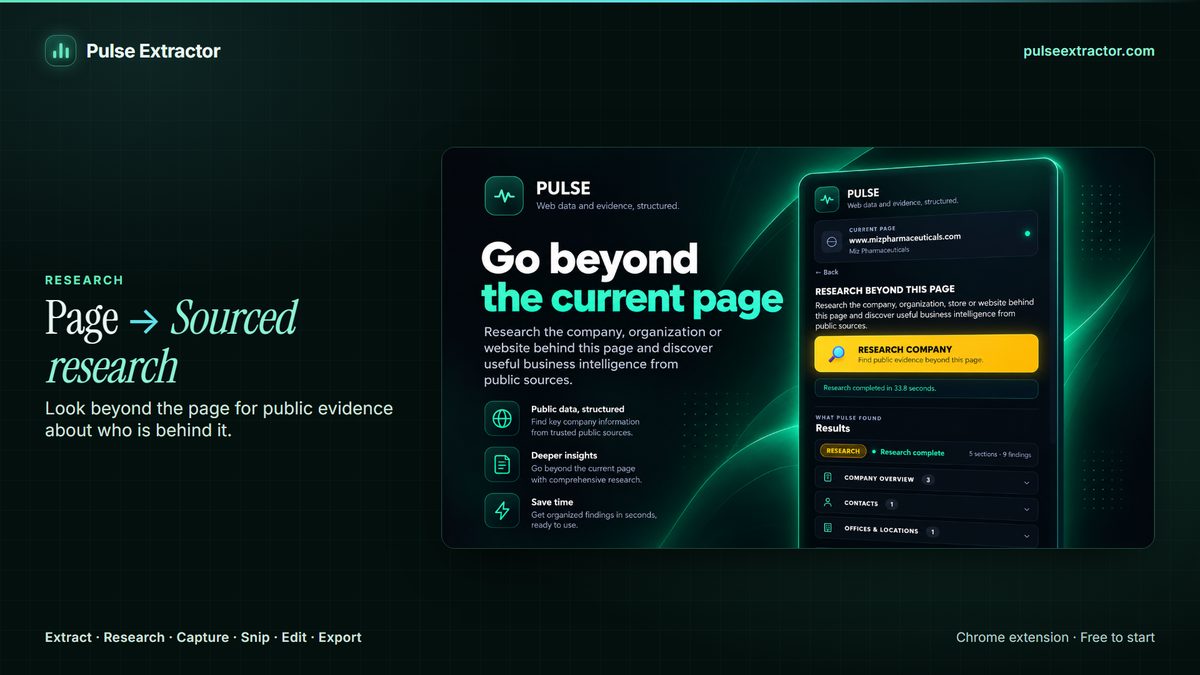
Pulse Extractor is a Chrome extension that helps with the reading and the note taking, and keeps the sources attached.
- Add Pulse Extractor to Chrome from the Chrome Web Store and sign in with a free account. No card is required.
- Open the company's website and click the Pulse icon.
- Choose Extract Page to structure the page you are on: what the business does, its service lines, locations and the contact routes it publishes.
- Choose Research to go further. Research starts from that same page, explores high value pages across the company's own website, then checks relevant wider public sources, guided by a research preset.
- Review the result and export it to Excel, a PDF report, CSV or JSON.
The Research presets are Contact discovery, Projects & activities, Relationships discovery, Procurement discovery and Products & specifications, or you can describe the evidence you need. A result comes back as SUCCESS, PARTIAL or Insufficient evidence. Where the evidence supports them, a report can include sections such as Executive Summary, Company Profile, Key People & Contacts, Procurement and Sources. Stronger findings are promoted, and useful but uncertain ones stay clearly labelled with their supporting source instead of being turned into fact.
Research is metered in runs: Free includes 1 lifetime Research run, Lite 3 a month, Starter 15 a month, Pro 40 a month and Intelligence 100 a month. One run is charged only for a completed, billable result, and an Insufficient evidence result is never charged. Extract Page never uses a Research run.
When Pulse is not the right tool
- You need a list of companies matching a sector, size or region. Pulse is not a company database and holds no list to search; a firmographic database is built for that.
- You need personal email addresses or direct phone numbers for named people. Pulse surfaces the contact routes an organization publishes publicly; it is not a contact database.
- You need credit risk or audited financials. Use filed accounts and a credit reference provider.
- The information is private or behind a sign in. Research only uses publicly reachable sources.
Limitations to know
- Thin websites give thin results. Companies that are very small, very new or very regional may publish little, and Research will say so with a PARTIAL or Insufficient evidence result rather than filling the gap.
- Not every field exists for every company. Pulse would rather leave a field blank than make one up.
- Verification is still your call. Sources are attached so that you can check anything important, especially before a contract or payment.
- Personal information deserves care. Treat names and roles the way you would if you had read them yourself; see Responsible Use.
Questions
Is the information up to date?
Pulse reads what the company's website and the public sources it checks publish when you run it, rather than a record assembled some time ago. That also means it can only be as current as those sources.
Am I charged if Research finds nothing useful?
No. An Insufficient evidence result is never charged. One Research run is used only for a completed, billable result.
Where does Research start?
From the page you have open, usually the company's own website. It uses that page as its baseline and then looks further.